Zooz
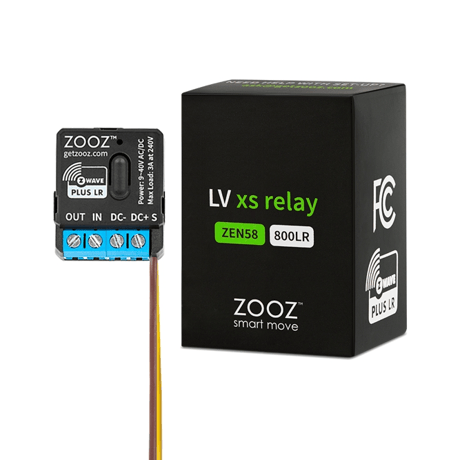
Low Voltage XS Relay
ZEN58 800LR
Binary Switch DT
HW: 01 FW: 01.10
EFR32ZG23A
7.18.8
0x027A (634)
0x0004 (4)
0x0322 (802)
ZC14-25080541
2025-08-19 12:05:49
N/A
Enhanced End Node 232
Always On End Node
Add Z-Wave to garage doors, entry gates, gas fireplace, or any analog equipment under 3A.


1 - LED Indicator
Choose if you want the LED to indicate the on/off status of the load or if you want it to remain on or off at all times.Size: 1 byte
Default: 1
Minimum: 0
Maximum: 1
Possible values
| From | To | Desription |
|---|---|---|
| 0 | 0 | LED always off |
| 1 | 1 | LED on when load on, LED off when load off |
2 - On/Off Status After Power Failure
Set the on off status for the relay after power failure.Size: 1 byte
Default: 2
Minimum: 0
Maximum: 2
Possible values
| From | To | Desription |
|---|---|---|
| 0 | 0 | always off once restored |
| 1 | 1 | always on once restored |
| 2 | 2 | remembers and restores status |
3 - Status Report Type
Choose physical (wall switch) and Z-Wave triggers for the relay to send a status change report to the hub. See manual for details.Size: 1 byte
Default: 1
Minimum: 0
Maximum: 1
Possible values
| From | To | Desription |
|---|---|---|
| 0 | 0 | Binary Switch reports for Z-Wave control and Basic Reports for wall switch control |
| 1 | 1 | Binary Switch reports for both Z-Wave and wall switch control |
4 - Scene Control
Enable or disable scene control functionality for quick double tap triggers.Size: 1 byte
Default: 1
Minimum: 0
Maximum: 1
Possible values
| From | To | Desription |
|---|---|---|
| 0 | 0 | scene control disabled |
| 1 | 1 | scene control enabled |
5 - Input Type
Choose the wall switch or input type you want to connect to the relay. See manual for details.Size: 1 byte
Default: 0
Minimum: 0
Maximum: 10
Possible values
| From | To | Desription |
|---|---|---|
| 0 | 0 | automatic detection |
| 1 | 1 | toggle switch (state changes whenever the switch is toggled) |
| 2 | 2 | momentary push button |
| 3 | 3 | toggle switch (light on when the switch is toggled up, light off when the switch is toggled down) |
| 4 | 4 | leak alarm (water sensor) |
| 5 | 5 | heat alarm |
| 6 | 6 | motion alert |
| 7 | 7 | open/close alert (door sensor) |
| 8 | 8 | CO alarm |
| 9 | 9 | CO2 alarm |
| 10 | 10 | on/off report (dry contact switch/sensor) |
6 - Inclusion From Switch
Enable (1) or disable (0) ZEN57 inclusion/exclusion via 3 quick toggles (up-down sequences) of the connected wall switch.Size: 1 byte
Default: 1
Minimum: 0
Maximum: 1
Possible values
| From | To | Desription |
|---|---|---|
| 0 | 0 | Disable inclusion from switch |
| 1 | 1 | Enable inclusion from switch |
7 - Auto Turn-Off Timer
Auto-off timer will automatically turn the relay off after x seconds once it has been turned on.Size: 4 bytes
Default: 0
Minimum: 0
Maximum: 2678400
Possible values
| From | To | Desription |
|---|---|---|
| 0 | 0 | Timer disabled |
| 1 | 2678400 | 1-2678400 (seconds) |
8 - Auto Turn-On Timer
Auto-on timer will automatically turn the relay on after x seconds once it has been turned off.Size: 4 bytes
Default: 0
Minimum: 0
Maximum: 2678400
Possible values
| From | To | Desription |
|---|---|---|
| 0 | 0 | Timer disabled |
| 1 | 2678400 | 1-2678400 (seconds) |
9 - Relay Control (Smart Bulb Mode)
Enable or disable physical and Z-Wave on/off control. Disable both (value 2) for smart bulbs.Size: 1 byte
Default: 1
Minimum: 0
Maximum: 2
Possible values
| From | To | Desription |
|---|---|---|
| 0 | 0 | Disable control from switch and button |
| 1 | 1 | Enable switch, button, and Z-Wave control |
| 2 | 2 | Disable switch, button, and Z-Wave control |
10 - Relay Type (NO/NC)
Set the relay to act as normally closed (1). Expert users only. See manual for details.Size: 1 byte
Default: 0
Minimum: 0
Maximum: 1
Possible values
| From | To | Desription |
|---|---|---|
| 0 | 0 | NO (normally open) |
| 1 | 1 | NC (normally closed) |
11 - Input Trigger
Choose whether the input (wall switch) on the ZEN57 triggers the output (load) or just sends input reports for monitoring, keeping output separate.Size: 1 byte
Default: 0
Minimum: 0
Maximum: 1
Possible values
| From | To | Desription |
|---|---|---|
| 0 | 0 | Input trigger enabled |
| 1 | 1 | Input trigger disabled |
12 - Scene Control Multi-Tap
Disable multi-tap scene control so that only single taps from the connected wall switch report via central scene.Size: 1 byte
Default: 1
Minimum: 0
Maximum: 1
Possible values
| From | To | Desription |
|---|---|---|
| 0 | 0 | multi-tap for scene control disabled |
| 1 | 1 | multi-tap for scene control enabled |
13 - Reversed Reports For Input
Reverse the reported values for your selected input type (value 1). Expert users only. See manual for details.Size: 1 byte
Default: 0
Minimum: 0
Maximum: 1
Possible values
| From | To | Desription |
|---|---|---|
| 0 | 0 | values reported as normally open, not reversed |
| 1 | 1 | input values reversed |
initiate inclusion (pairing) in the app or hub UI. Make sure the device is powered and finalize the inclusion at the relay: tap the Z-Wave® button on the relay 3 times quickly.
1. Bring your Z-Wave® gateway (hub) close to the relay if possible 2. Put the Z-Wave® hub into exclusion mode 3. Click the Z-Wave® button on the relay 3 times quickly (the LED indicator will start blinking green) 4. Your hub will confirm exclusion, the LED indicator on the relay will turn green for 2 seconds, and the device will be removed.
If your primary controller is missing or inoperable, you may need to reset the device to factory settings. To reset the relay, click the Z-Wave® button once and immediately after, press and hold the button for 15 seconds. The LED indicator will flash during the process and turn red for 3 seconds to confirm successful reset. NOTE: All previously recorded activity and custom settings will be erased from the device’s memory.
The SmartStart QR code / security PIN is located on the back of the relay.
| Type | Value(s) |
|---|