Aeotec
Heavy Duty Smart Switch Gen5
ZW078-A_Aeon_1406
On/Off Power Switch
HW: 78 FW: 3.26
ZM5202
6.51.00
0x0086 (134)
0x0103 (259)
0x004E (78)
ZC10-14060004
2014-05-16 15:28:57.376591
N/A
Enhanced 232 Slave
Always On Slave
Heavy Duty Smart Switch Gen5.
Aeon Labs Heavy Duty Smart Switch is a Z-Wave device that can report the wattage energy usage and KWH usage to a Z-Wave Controller (especially a gateway), it can be controlled by other Z-Wave devices to turn on/off loads, it can bear up to 40A current of resister loads. It also acts as a repeater that forward Z-Wave command messages to destination nodes if the originating controller is out of range from the destination node. By taking advantage of the Z-Wave mesh network, commands can be routed to their destination via intermediary “listening” Z-Wave products. Products that are Z-Wave certified can be used and communicate with other Z-Wave certified devices.
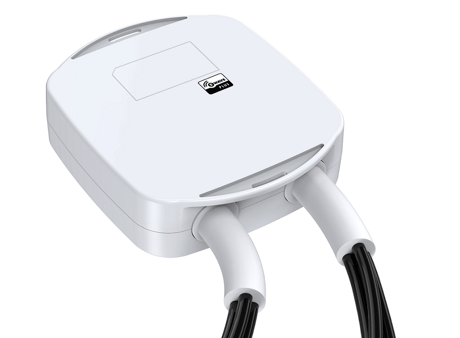
Product Picture


3 - Current Overload Protection
This parameter is used for the overload protection, which means the load will be disconnected after 5 seconds when the current more than 39.5A.Size: 1 byte
Default: 0
Minimum: 0
Maximum: 0
Possible values
| From | To | Desription |
|---|---|---|
| 0 | 1 | 0=disabled, 1=enabled |
80 - Enable/Disable to send notifications to associated devices to associated devices
This parameter is used to Enable/Disable to send notifications to associated devices (in Group 1) when the state of Heavy Duty Smart Switch Gen5’s load is changed. (0=send nothing, 1=send hail CC, 2=send basic CC report).Size: 1 byte
Default: 0
Minimum: 0
Maximum: 0
Possible values
| From | To | Desription |
|---|---|---|
| 0 | 2 | (0=nothing, 1=hail CC, 2=basic CC report |
90 - Enable/Disable the function of parameter 91 and 92
This parameter is used to Enable/Disable the function of parameter 91 and 92 below (1=Enabled, 0=Disabled).Size: 1 byte
Default: 1
Minimum: 0
Maximum: 0
Possible values
| From | To | Desription |
|---|---|---|
| 0 | 1 | 0=disabled, 1=enabled |
91 - Induce an automatic report
This parameter is used to induce an automatic report when the change of the current power is more/less than the threshold in wattage.Size: 2 bytes
Default: 50
Minimum: 0
Maximum: 0
Possible values
| From | To | Desription |
|---|---|---|
| 0 | 60000 | The threshold can be set from 0 to 60000 watt. |
92 - Induce an automatic report
This parameter is used to induce an automatic report when the change of the current power is more/less than the threshold in percentage.Size: 1 byte
Default: 10
Minimum: 0
Maximum: 0
Possible values
| From | To | Desription |
|---|---|---|
| 0 | 100 | The threshold can be set from 0 to 100 percent. |
100 - Set parameter 101~103 to default.
This parameter is used to restore the parameter 101, 102 and 103 to default setting.Size: 1 byte
Default: 0
Minimum: 0
Maximum: 0
Possible values
| From | To | Desription |
|---|---|---|
| 0 | 1 | When value==1, parameters 101 ~103 will be restored to default setting. When value==0, it will not restore any parameter. |
101 - to set which report need to be sent.
This parameter is used to configure which reports need to be sent in Report Group 1 (The possible values as below).Size: 4 bytes
Default: 4
Minimum: 0
Maximum: 0
Possible values
| From | To | Desription |
|---|---|---|
| 0 | 15 | When value==1, which means the Voltage report is configured to be sent in Report Group 1. When value==2, which means the Current report is configured to be sent in Report Group 1. When value==4, which means the Wattage report is configured to be sent in Report Group 1. When value==8, which means the KWH report is configured to be sent in Report Group 1. When value==15, which means the Voltage , Current , Wattage and KWH report are all configured to be sent in Report Group 1. The other values will be reserved. |
102 - to set which report need to be sent.
This parameter is used to configure which reports need to be sent in Report Group 2 (The possible values as below).Size: 4 bytes
Default: 8
Minimum: 0
Maximum: 0
Possible values
| From | To | Desription |
|---|---|---|
| 0 | 15 | When value==1, which means the Voltage report is configured to be sent in Report Group 2. When value==2, which means the Current report is configured to be sent in Report Group 2. When value==4, which means the Wattage report is configured to be sent in Report Group 2. When value==8, which means the KWH report is configured to be sent in Report Group 2. When value==15, which means the Voltage , Current , Wattage and KWH report are all configured to be sent in Report Group 2. The other values will be reserved. |
103 - to set which report need to be sent.
This parameter is used to configure which reports need to be sent in Report Group 3 (The possible values as below).Size: 4 bytes
Default: 0
Minimum: 0
Maximum: 0
Possible values
| From | To | Desription |
|---|---|---|
| 0 | 15 | When value==1, which means the Voltage report is configured to be sent in Report Group 3. When value==2, which means the Current report is configured to be sent in Report Group 3. When value==4, which means the Wattage report is configured to be sent in Report Group 3. When value==8, which means the KWH report is configured to be sent in Report Group 2. When value==15, which means the Voltage , Current , Wattage and KWH report are all configured to be sent in Report Group 3. The other values will be reserved. |
110 - Set parameter 111~113 to default.
This parameter is used to restore the parameter 111, 112 and 113 to default setting.Size: 1 byte
Default: 0
Minimum: 0
Maximum: 0
Possible values
| From | To | Desription |
|---|---|---|
| 0 | 1 | When value==1, parameters 111 ~113 will be restored to default setting. |
111 - Set the interval time of sending report.
This parameter is used to set the interval time of sending report in Report Group 1. (The unit of time is second).Size: 4 bytes
Default: 5
Minimum: 0
Maximum: 0
Possible values
| From | To | Desription |
|---|---|---|
| 0 | 268435456 | You have a wide range to set the interval time that can be set from 0 to 268435456 seconds. |
112 - Set the interval time of sending report.
This parameter is used to set the interval time of sending report in Report Group 2. (The unit of time is second).Size: 4 bytes
Default: 120
Minimum: 0
Maximum: 0
Possible values
| From | To | Desription |
|---|---|---|
| 0 | 268435456 | You have a wide range to set the interval time that can be set from 0 to 268435456 seconds. |
113 - Set the interval time of sending report.
This parameter is used to set the interval time of sending report in Report Group 3. (The unit of time is second).Size: 4 bytes
Default: 120
Minimum: 0
Maximum: 0
Possible values
| From | To | Desription |
|---|---|---|
| 0 | 268435456 | You have a wide range to set the interval time that can be set from 0 to 268435456 seconds. |
200 - Partner ID
This parameter is used to configure the partner ID. 0== Aeon Labs Standard Product, 1~255== others.Size: 1 byte
Default: 0
Minimum: 0
Maximum: 0
Possible values
| From | To | Desription |
|---|---|---|
| 0 | 255 | There are 255 different partners can be configured. |
252 - Enable/Disable Lock Configuration
This parameter is used to Enable/Disable Lock all configuration parameters. (0 =disable, 1 = enable)Size: 1 byte
Default: 0
Minimum: 0
Maximum: 0
Possible values
| From | To | Desription |
|---|---|---|
| 0 | 1 | When value==0, all configuration parameters are configurable. When value==1, all configuration parameters are not configurable.(Locked). |
255 - Reset to default factory setting
This parameter is used to reset product to default factory setting. (There are just 2 values can be used)Size: 4 bytes
Default: 0
Minimum: 0
Maximum: 0
Possible values
| From | To | Desription |
|---|---|---|
| 0 | 1431655765 | When value==1431655765, it will reset the product to default factory setting and be excluded from Z-wave network. When value==1, it only will reset the all configuration parameters to default setting. The other values will be reserved. |
Turn the primary controller of Z-Wave network into inclusion mode, short press the product’s Z-Wave button.
Turn the primary controller of Z-Wave network into exclusion mode, short press the product’s Z-Wave button.
N/A
N/A
Press and hold the Z-Wave button for 20 seconds and then release.
Measuring the temperature inside the product.